CoreX
One system runs our halls, our bills and our repairs.
We built CoreX ourselves, and every team at Segments works in it: helpdesk, operations, repairs, maintenance, logistics, clients, sales and finance, with one app for the field. It reads every hosted miner, opens the ticket when one stops, issues the invoice at month end and shows the client all of it in their portal.
Live from our operations systemas of 08:35 GST
6,074
machine capacity
- hashrate capacity
- 1.24EH/s
- power capacity
- 25.3/ 34 MW
One machine, one year
Follow one miner through CoreX.
Day 1
Bought, and invoiced
The deal lives in the sales workspace: chat, proforma, then a UAE tax invoice with our TRN, VAT (5%) and the amount in dirhams at the Central Bank of the UAE rate. Every client gets the same tax invoice, in the UAE or abroad.
Day 2
Onboarded from one link
The client gets one link: their details, ID documents, the pool and worker for each miner, then the hosting agreement, signed online.
Day 9
Racked, and read
The agent in the hall reads the miner every 30 seconds: hashrate, hashboards, fans and temperatures. Fleet Command shows it beside the pool's figure and the hall's power and climate.
Day 143, 02:14
It stops
The pool sees no new shares. A rule raises an alert after 5 minutes and an incident opens at 15, with the fault type and the miner's asset tag. Diagnosis, the client's approval and the part all happen on that one ticket.
Day 143, 03:10
At the bench
A fault that needs the lab goes on the repair board: tagged, diagnosed, waiting on the client's approval, on the bench, back online. The client sees the estimate and approves it in the portal.
Month end
Billed on what it used
At month end the billing run maps every worker to its client, checks rates and power against the record and drafts each invoice. Every draft is checked automatically, and nothing reaches a client until a person sends it.
Any day
What the client sees
Every machine, its alerts, invoices, repairs and contracts, in one portal and in 6 languages.
Day 365
Sold where it runs
Listed on the Segments marketplace without leaving the hall. The ad carries the running hours CoreX measured, and a CoreX-verified badge that lapses if the machine stops reporting.
Sample machine and account. Screens redrawn, figures invented.The night it stopped, minute by minute
Three signals, one figure
Three sources for every machine's hashrate.
A miner's hashrate is reported three times: by the machine, by the pool it hashes to, and by the provider when it runs through one. CoreX keeps all three side by side.
01
The agent in the hall
Reads the machine itself: hashboards, chips, fans, temperatures and the hashrate it reports.
02
The pool
Reports the shares it actually credited. This is the figure the machine earns on.
03
The provider
Where a machine hashes through a provider, its own figure is the third check.
When the three disagree, someone looks
A machine that reports more than the pool credits shows up as a gap in CoreX. The same view covers every algorithm in our halls.
- SHA-256
- Scrypt
- kHeavyHash
- Eaglesong
Illustration
On a schedule
What runs without anyone pressing a button.
01
Every 30 seconds
The agent in each hall reads every miner.
02
After 15 minutes
A miner the agent has not seen for 15 minutes counts as offline.
03
Alert at 5 minutes, ticket at 15
A miner that stops hashing raises a rule alert, then opens a ticket with an engineer on it.
04
At 85 °C and 95 °C
A hashboard at 85 °C raises a warning; at 95 °C it is critical.
05
Under 500 rpm
A fan below 500 rpm for 3 minutes raises an alert before the board overheats.
06
A digest every 5 minutes
Alerts from one centre reach the team as one digest. 8 or more critical miners at once are handled as one site event.
07
This site, every 5 minutes
The figures on this website come from CoreX. When they are older than 30 minutes, the site shows none rather than old ones.
08
Every day
The dirham rate on invoices is read from the Central Bank of the UAE.
09
Pool and worker settings
Every miner's pool and worker settings are checked against the settings on record, and CoreX shows how much of the fleet matches.
10
Humidity and dew point
Sensors in each hall read humidity, ambient temperature and dew point. The evaporative cooling pumps are held when the air is too humid to cool safely.
Every centre
Every centre, as CoreX reports it.
Status, power and uptime for each hosting centre, straight from CoreX. The same feed drives the hosting pages and the status page.
Live from our operations systemas of 08:35 GST
| Centre | Availability | Power | uptime, last 30 days |
|---|---|---|---|
| F20 | Slots open | 0.67 of 0.80 MW in use | – |
| F21 | Slots open | 0.29 of 0.30 MW in use | – |
| F22 | Slots open | 0.81 of 0.85 MW in use | – |
| F23 | Slots open | 0.81 of 0.85 MW in use | – |
| F24 | Slots open | 0.82 of 0.85 MW in use | – |
| F39 | Slots open | 0.37 of 0.85 MW in use | – |
| F40 | Slots open | 0.93 of 1.25 MW in use | – |
| F48 | Ask for availability | – | – |
| F49 | Ask for availability | – | – |
| F54 | Slots open | 1.07 of 1.25 MW in use | – |
Everything connects here
One system, from the rack to the invoice.
Every team at Segments works in CoreX, and the outside systems we rely on report into it.
CoreX
Inside CoreX
- Helpdesk
- Operations
- Repairs
- Maintenance
- Logistics
- Clients
- Sales
- Marketplace
- Client messages
- Finance
- Client portal
- Field app
Connected to
- SegPool
- F2Pool
- ViaBTC
- Braiins
- Luxor
- AntPool
- NiceHash
- Telegram
- Slack
- segments.ae
What the client sees
Your fleet, your bills and your repairs, in one portal.
Your miners, invoices and reports. One login.
Every hosting client gets an account on the Segments client portal. See each machine live, pay invoices, follow repairs and download reports, in your language, on the web or as an app on your phone.
Your whole fleet at a glance: machines online, hashrate, amount due and anything that needs you.
Overview
Tue 6 Oct · Sample client
Fleet
24 / 24 online
- Hashrate, last 15 min
- 5.31 PH/s
- 24 h average
- 5.36 PH/s
Billing
$0.00
Paid upAmounts in USD and AED. Hosting is invoiced on the 1st.
Recent activity
Yesterday
13:07Payment confirmedBilling
09:41Monthly report readyInsights
What our team sees
The staff side of CoreX, screen by screen.
These are the screens our team works in every day, redrawn with sample data so no client or colleague is shown.
The day at a glance: fleet health, outages, open tickets, repairs and the state of our own systems.
What our operations team sees.
Our operations system follows every machine from its hashboards to the pool. These are real screens from it.
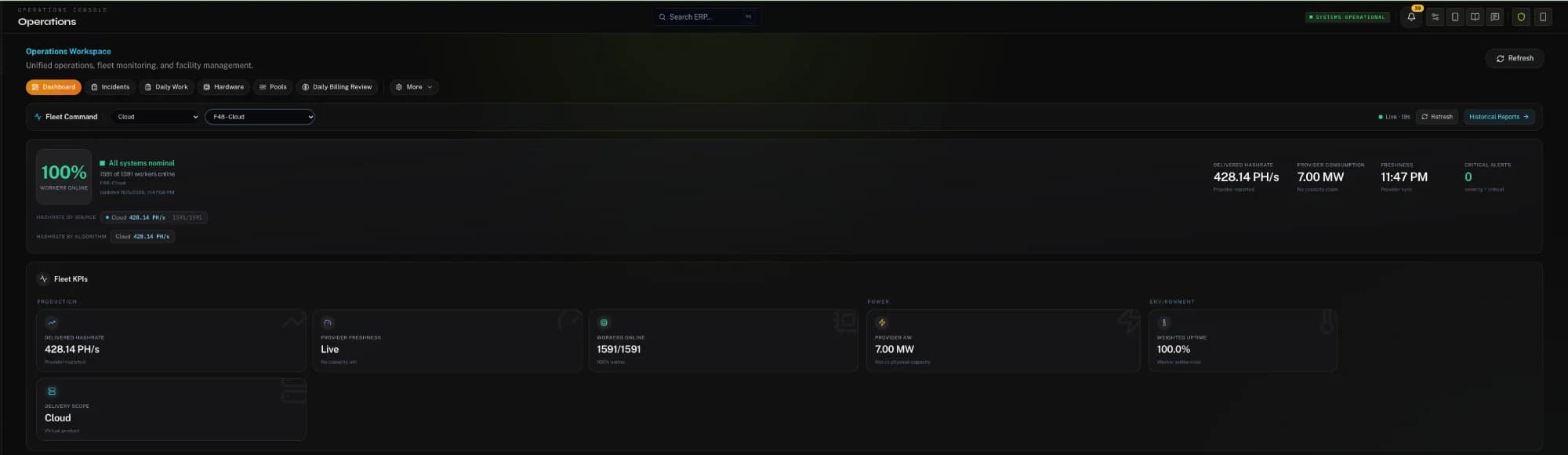
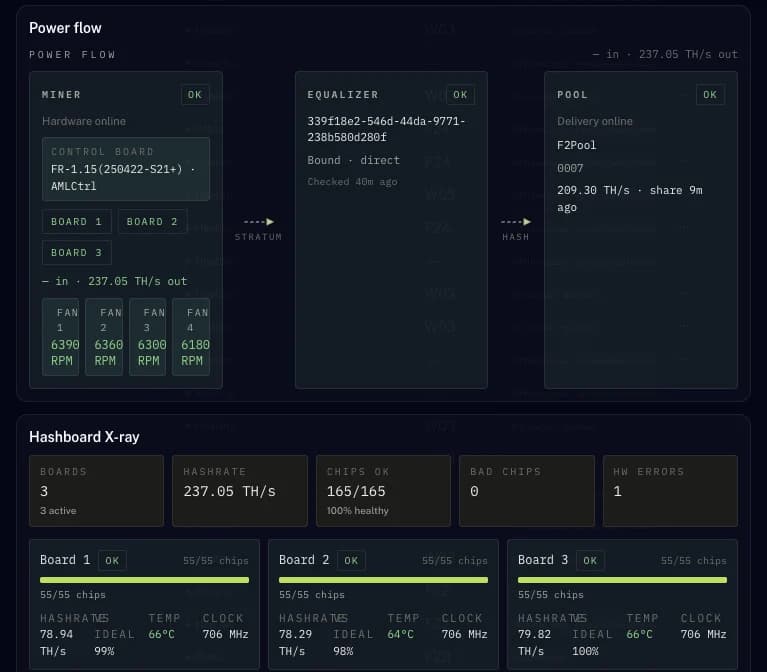
Screens from our operations system on 5 October 2026. Customer details removed.
Money and control
Nothing moves in CoreX without a record.
One kind of invoice
Every client gets a UAE tax invoice with VAT (5%), numbered without gaps.
A person sends every invoice
Each draft invoice is checked automatically against the rates and power on record. Nothing reaches a client until someone presses send.
Two people for money out
Outgoing bank payments need two approvers. A large invoice needs a second person before it is sent.
A person decides
Switching a client's machine off always needs a person to approve it. No rule does it alone.
Messages reviewed before they go
Repair approval reminders and other client follow-ups are drafted into a queue, where a person reviews them before they are sent.
Every change logged
Each pool or worker change is kept in a log that cannot be edited, with who made it and when.
Each person sees their part
Access follows the role: a technician, an accountant and a client each see what their work needs.
One app for the field
Engineers and drivers carry CoreX on their phones: incidents, repairs, transfers and approvals, in 6 languages.
The same figures everywhere
The portal, our team and this website read the same records, so a machine's hours, uptime and bills agree wherever you look.
Run your own site?
CoreX for your site.
The system we run our centres on can run yours: monitoring, tickets, billing and a portal for your clients. Tell us about your site and we will show you CoreX at work.
Host where CoreX watches your machines.
Send us your machine list. We reply with a hosting quote, and every hosting client gets a portal account.