
Many first-time buyers picture hosting as a black box: you pay, a machine disappears into a hall, and coins appear. In practice it is a short chain of clear steps, and knowing them helps you ask the right questions before you sign. This guide walks through that chain in the order it happens.
Step 1: Delivery to a hosting centre
Once you have bought a miner, either through us or from another seller, it needs to reach one of our UAE hosting centres. We refer to each site by its code, for example F20 or F54. The right centre depends on how your machine is cooled and where space is available when your order is placed.
- Air-cooled miners go into air-cooled halls with racks and managed airflow.
- Hydro-cooled miners need a water-cooled container with pipework, so they are placed where that infrastructure exists.
- Shipping and import paperwork are handled before the machine is booked in. Timing depends on the shipper and customs, so we confirm dates as they become clear rather than promising them up front.
On arrival, each unit is checked against its paperwork, the serial number is recorded, and any visible transit damage is photographed and reported to you before installation.
Antminer S21 (200T)
200 TH · 17.8 J/TH
Today's price
$1,740
See this miner
Step 2: Installation and first power-on
The machine is placed in its rack position or hydro slot, connected to power and to the site network, and switched on under supervision. The technician watches the first boot: fans or coolant flow, hashboard detection, chip temperatures and the reported hashrate. A unit that comes up with a missing board or unusual readings is flagged to you straight away, with the logs, so that any seller claim can start early.

Step 3: Pool configuration and where rewards go
An ASIC miner does one job: it performs the proof-of-work hashing that secures Bitcoin, a design set out in the original whitepaper. On its own, a single machine would almost never find a block, so it joins a mining pool that combines hashrate and shares out rewards. Our guide to mining pools explains the payout methods in more detail.
- You open an account with the pool of your choice and create a worker name.
- You send us the pool address, your account name and the worker name.
- We enter these settings on the miner and confirm the pool sees it hashing.
- Rewards are paid by the pool to the wallet you set in your pool account, not to us.
Keeping the pool account in your own name means you control the payout address. The hosting team only needs the worker settings to point the machine at it.
Step 4: Monitoring and how you see your hashrate
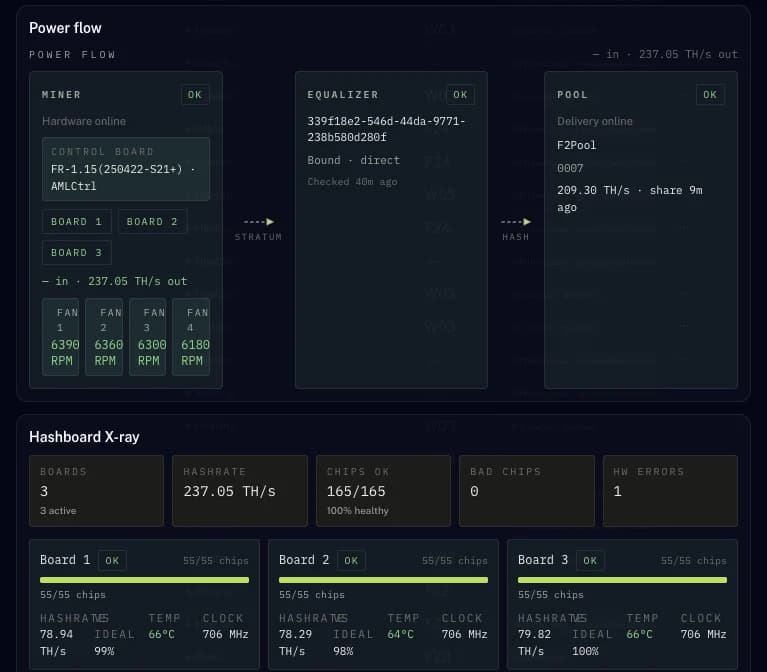
You see your machine in two places. The pool dashboard shows the hashrate the pool actually receives from your worker, your accepted shares and your earnings. That is the number that matters, because it is what you are paid on. The hosting side keeps its own view of the hardware: power draw, temperatures, fan or coolant status and hashboard health.
Small gaps between the hashrate the miner reports and the hashrate the pool shows are normal, as pool figures are averaged over time. A sustained drop is the signal for the team to look at the machine. Uptime is a target we work towards, not a promise, and our article on how mining uptime is measured explains what the number does and does not include.
Step 5: Maintenance and repairs
Miners run hard and run hot, so routine care is part of hosting. Typical work includes cleaning dust from air-cooled units, checking fans, watching coolant quality on hydro units and reseating cables. When a fault appears, such as a hashboard dropping out or a power supply failing, the team diagnoses it, tells you what was found and agrees the next step with you before any parts are charged. On Full-care hosting, repairs carry no charge. Common faults are covered in our guide to Antminer repair.
What goes into a hosting bill
Your hosting bill is mostly about electricity. A miner draws a steady amount of power, and that consumption is what you pay for each period. Around it sit the other items your agreement spells out.
| Item | What it covers |
|---|---|
| Power | The energy your miner consumes, metered or calculated from its rated draw |
| Hosting service | Rack or hydro space, cooling, network and on-site staff |
| Repairs and parts | Diagnosis and replacement parts, agreed with you before work |
| Setup | Receiving, checking and installing the unit, where applicable |
Segments has two plans, Hosting and Full-care hosting, which treat repairs differently, and the hosting page shows the current terms of each. Ask for the terms in writing and compare them line by line. For a worked walkthrough, read the mining hosting bill explained.
Questions
- Do I need to send my miner to a specific UAE hosting centre?
- No. We place it in a centre that fits its cooling type and has space at the time, for example F20 or F54. Air-cooled units go into air halls and hydro-cooled units go where water-cooled containers are installed. We confirm the centre code before delivery.
- Who receives the mining rewards from a hosted miner?
- You do. The miner is pointed at your own pool account, and the pool pays the wallet address you set there. The hosting team only enters the pool and worker settings on the machine.
- How do I check that my hosted miner is working?
- Log in to your pool dashboard and look at your worker. It shows the hashrate the pool receives, accepted shares and earnings. If the hashrate drops and stays low, contact us and the team will check the hardware and report back.
Sources
- Bitcoin: A Peer-to-Peer Electronic Cash System · bitcoin.org, 2008-10-31